Guide · China · Payments
Alipay in Russia in 2026: How to Install, Register and Use It
Learn how to install and set up Alipay as a user from Russia: phone registration, identity verification, linking a foreign bank card, transfers and payments in China.
Alipay in Russia: Key Points
An overview of registration, verification, cards and payments.- RegistrationAlipay supports registration with a foreign phone number through its app. Check whether your Russian number is accepted and can receive SMS messages in the current version.Check in the app
- VerificationIdentity verification and an identification document may be required to access the full range of features.Document required
- Russian bank cardLinking a Russian bank card does not guarantee successful payments. Russian-issued Visa and Mastercard cards do not work for transactions abroad.Restricted
- Payment through ATM24Before you pay, we check whether the transaction is available and confirm the terms.Subject to checks
Updated 2 October 2026
Quick Answer
“An Alipay account can be registered with a Russian +7 phone number through the app. A verification code is sent by SMS, but registration and code delivery may depend on the current app version. An international travel passport may be required for identity verification. Visa and Mastercard cards issued by Russian banks do not work outside Russia, so paying through Alipay requires a supported foreign bank card or another available payment method.”
Current Alipay Requirements
Available features depend on your account status and payment method. Check the terms in the app before making a transfer or purchase.
| Feature | Requirement | What to know | Source |
|---|---|---|---|
| Registration | Foreign or Chinese phone number | Alipay allows registration with a foreign or Chinese phone number. For a Russian +7 number, check whether SMS verification is available in the current app version. | China's Ministry of Commerce, 2026 guide; Hunan government publication dated 19 January 2026 |
| Identity verification | International travel passport | Foreign users may need a passport to verify their identity. Any further requirements are shown in the app. | Alipay Help Center |
| Foreign bank card | Supported networks and issuers are listed in the app | The 2026 guide lists Visa, Mastercard, UnionPay, American Express, JCB, Diners Club and Discover for mobile payment apps generally. Support varies by app; check your specific card when adding it to Alipay. | China's Ministry of Commerce, 2026 guide; Hunan government publication dated 19 January 2026 |
| Card issued by a Russian bank | Russian-issued Visa and Mastercard cards do not work outside Russia | Visa and Mastercard cards issued by Russian banks are not serviced by the international payment networks outside Russia. | Visa / Mastercard, official statements, 5 March 2022 |
| Where foreign bank cards can be used | Mainland China | Foreign bank cards linked to Alipay can be used at participating merchants in mainland China. Check availability and restrictions in the app before paying. | Alipay, User Service Agreement, section 2.2 (announcement dated 20 August 2021) |
- Mobile payments guide for foreign visitors, 2026 edition
- Alipay: international cards
- Alipay: identity verification for overseas users
- Visa: Russian-issued cards
- Mastercard: Russian-issued cards
- Alipay on the App Store
- Alipay: help and account recovery
- American Express: adding a card and Help Center
Does Alipay Work in Russia in 2026?
Registration
Alipay is available to users from Russia. You can register with a Russian +7 phone number, but SMS delivery and access to individual features may depend on the current app version.
Using Alipay and making payments
Account features can differ after registration. The app may offer document and face verification or request additional information. Successful identity verification alone does not guarantee access to transfers between Alipay accounts. Check transfer and payment availability separately in your account.
Getting Started with Alipay
From installing the app to your first payment.
1
Download
App Store or Google Play
2
Registration
+7 phone number
3
Verification
international travel passport
4
Payment source
card or balance
5
QR payment
at a merchant
Available features and payment methods depend on your account verification results.
What Is Alipay: a Wallet or a Bank?
Alipay is a digital wallet and payment app, not a bank
Alipay is a payment app and digital wallet for buying goods and services, QR payments, transfers and other features within its ecosystem.
Alipay and Alipay+
Alipay+ is not a separate consumer wallet. It is Ant International's global payment infrastructure, allowing merchants to accept Alipay and other supported wallets through a single integration.
What to Prepare Before Registering
Phone number
Keep access to your phone number and SMS messages: you may need them to confirm sign-ins and transactions.
Documents
Verification may require a valid international travel passport and your smartphone camera for identity checks.
Payment method
Decide in advance whether you will pay with a foreign bank card or your Alipay balance. Availability depends on your account and the merchant.
Official Alipay Website and App
iPhone
Download the official Alipay app from the App Store and check its name and developer before installing.
Android
Use Google Play if the app is available. Do not install payment apps from untrusted APK files.
Official website
The official website is alipay.com. Use the Alipay mobile app to register and make everyday payments.
What does the Alipay icon look like?
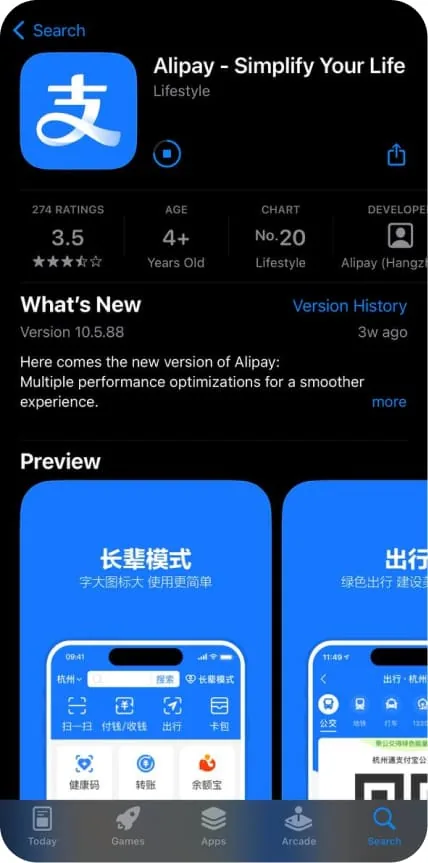
The app has a blue icon with the white Chinese character “支”. The first screenshot in this guide shows its app store listing. Check both the name and developer: on the App Store, the official app is called Alipay — Simplify Your Life, by Alipay (Hangzhou) Technology Co., Ltd. Open Alipay's official App Store listing to check the app before installing it.
How to Set Up Alipay: Step-by-Step Registration and Verification
Follow these steps to create an account, check your details and verify your identity. Menu names and the order of steps may vary by app version, region and account status; follow the prompts shown in Alipay.
Download the app
Find the official Alipay app in the App Store or Google Play and install it.
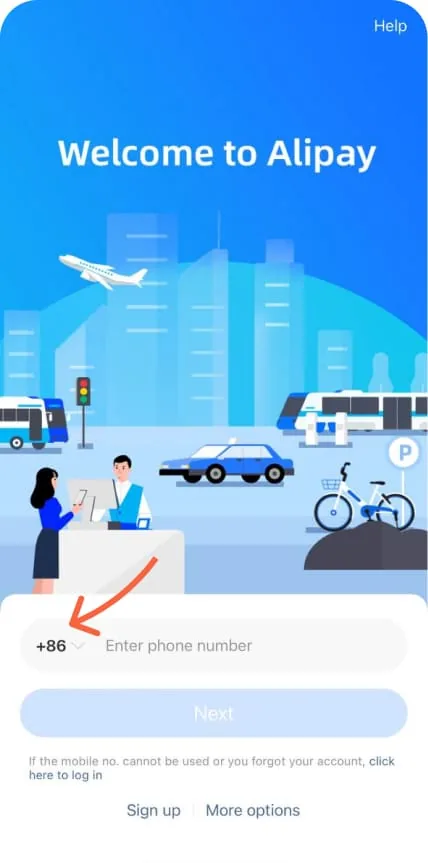
Select your country code
Tap the country code before the phone number and select +7.
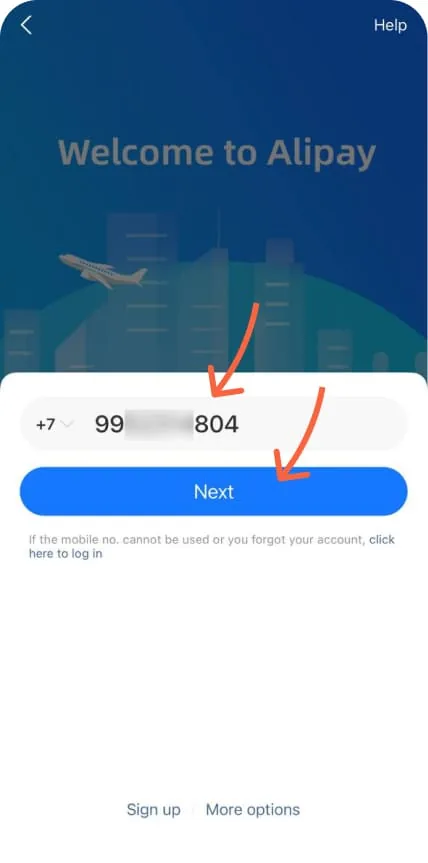
Enter your phone number
Enter your Russian phone number and tap Next.
Complete the security check
Complete the check shown in the app. For example, Alipay may ask you to shake your phone.

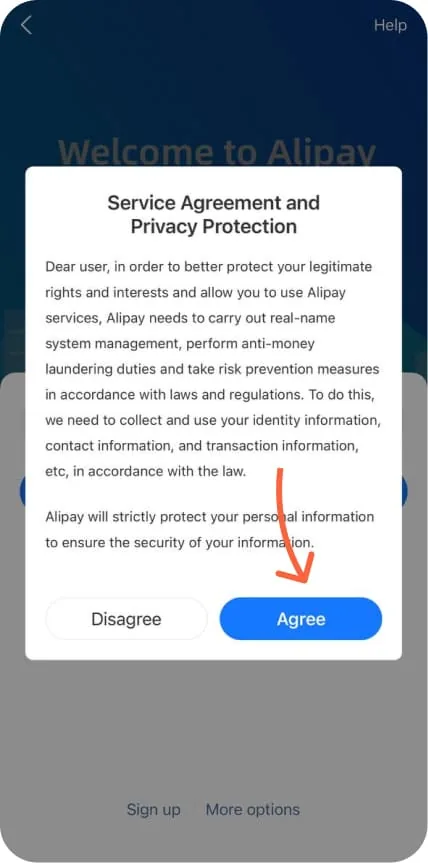
Accept the terms
Read the user agreement and confirm your acceptance.
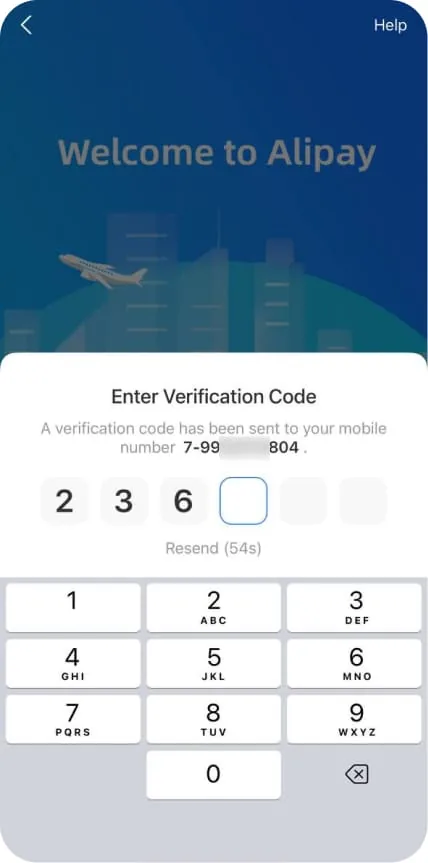
Enter the verification code
Enter the code sent by SMS to the phone number you provided.
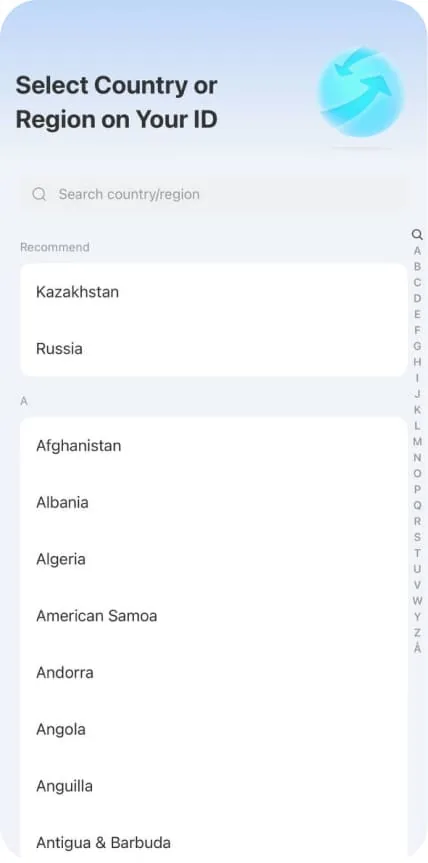
Confirm the country or region of your document
Select Russia if you are using a Russian international travel passport.
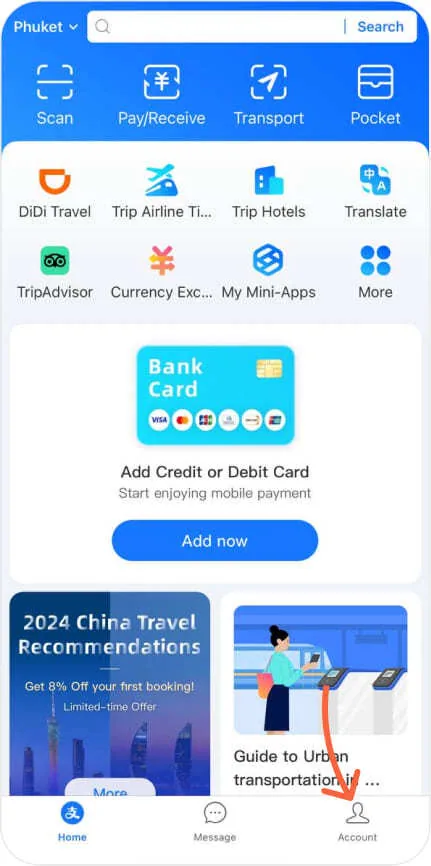
Open your profile
After registering, go to Account.
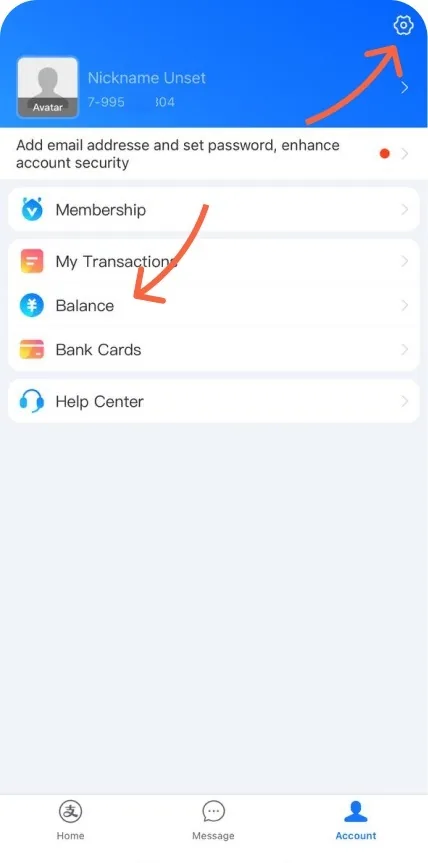
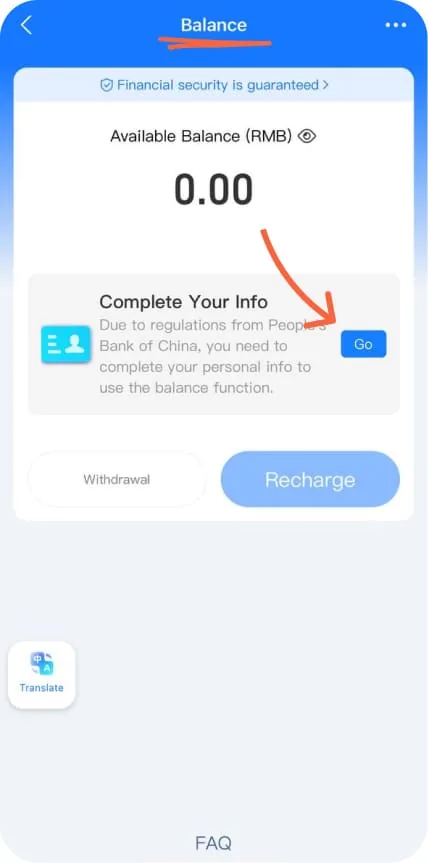
Go to Balance
Open Balance. If Complete Your Info appears, tap Go.
Start identity verification
Open Identity Verification to begin confirming your identity.
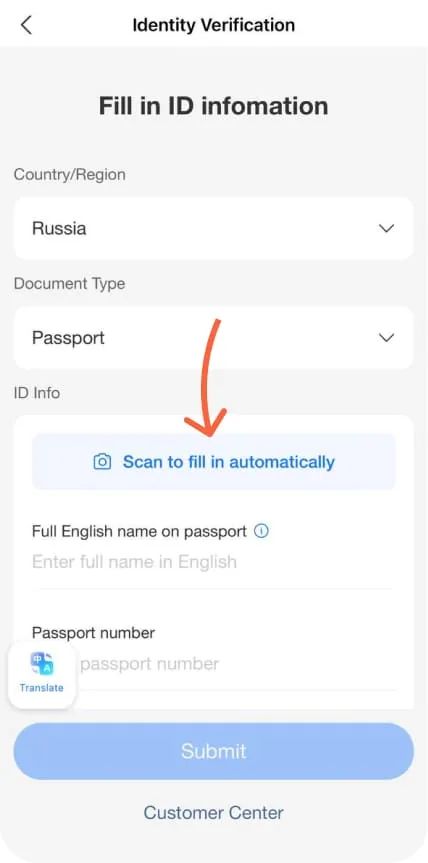
Add your passport details
Select Russia → Passport, then enter your details manually or scan your international travel passport.
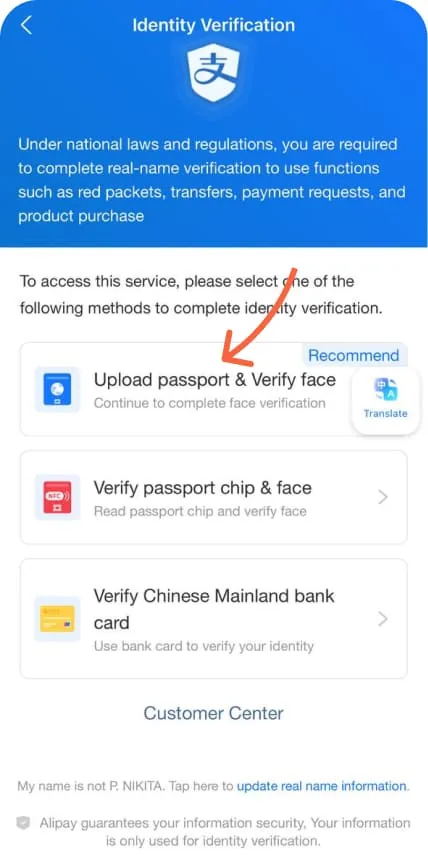
Choose an identity verification method
After uploading your document, choose an available verification method offered by Alipay.
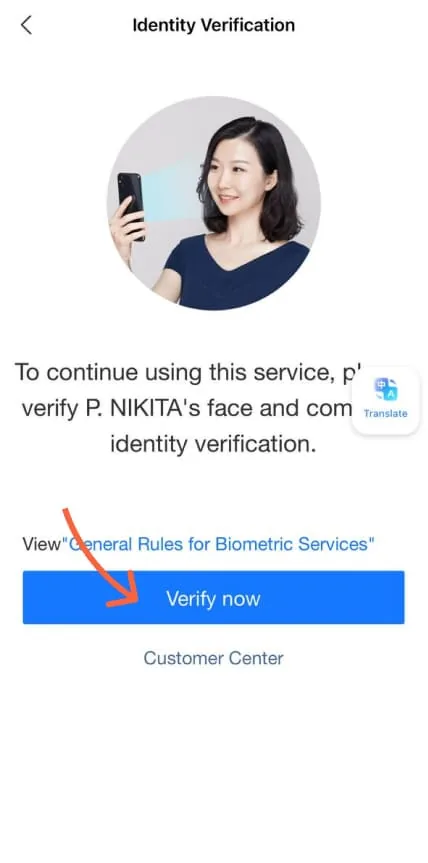
Complete face verification
Tap Verify now and follow the app's instructions.
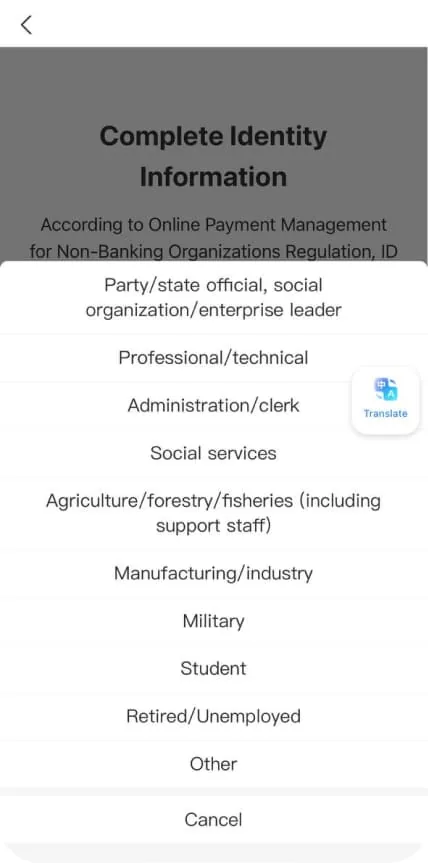
Enter your occupation
Select the appropriate occupation category from the list.
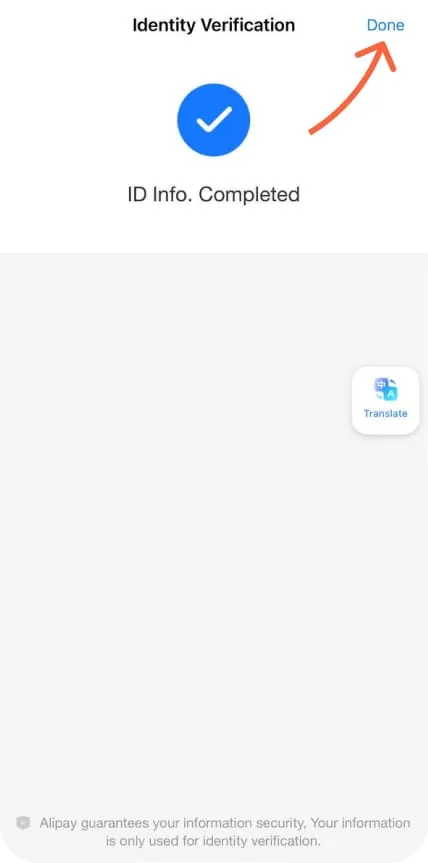
Finish verification
Once verification succeeds, the status ID Info. Completed will appear. Tap Done.
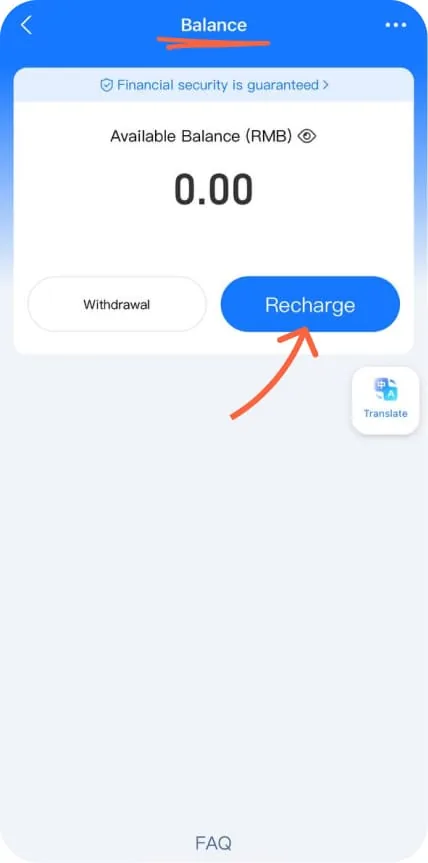
Go to top-up options
Open Balance and tap Recharge to see available features and ways to top up your account. If Set Payment Password appears, first create a payment password by following the app's instructions.
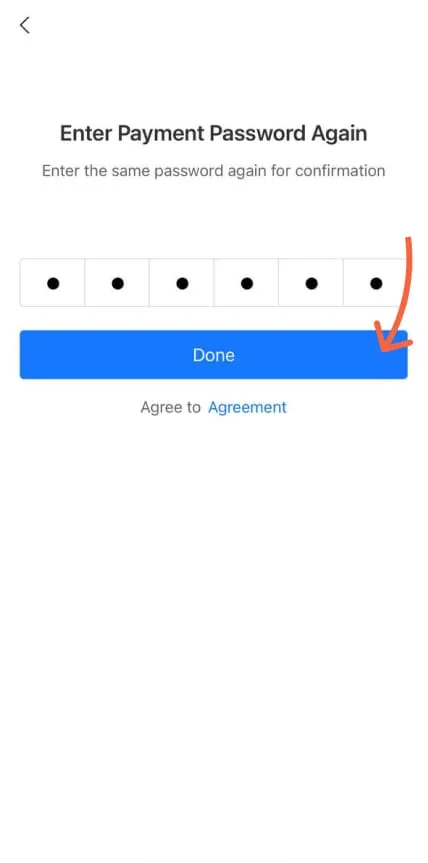
Confirm your payment password
When creating a password, enter it again to confirm and tap Done. If you already have a password, follow the app's prompts.
Your Alipay Account: Balance, Account Number and ID
Where to find your Alipay balance
Open Me / Account and go to Balance to view your wallet balance. The money on your linked bank card and your Alipay balance are separate payment sources: adding a card does not top up your wallet.
Where to find your account number
In Me / Account, open your profile details by tapping your name or avatar. Look for your account information and linked phone number. Field names may vary; if a specific ID is needed, ask the recipient which field they require and contact Help Center if necessary.
Does Alipay have a card number?
An Alipay account does not have a separate universal bank card number. Your phone number, profile ID, linked card details and QR code are different pieces of information. Before a transfer or payment, confirm which details are needed for that transaction.
How to Transfer Money to Alipay from Russia
Sending money to your wallet or another recipient
Before sending money to Alipay, clarify whether you need to top up your own balance, send money to another user or pay for a purchase. Check your verification status, transaction availability and recipient details in the app. Paying with a linked foreign bank card and transferring money from your balance are different operations. Under Alipay's international card service terms, that service is for purchases at participating merchants in mainland China, not money transfers or cash withdrawals.
Transfers through ATM24
If you need help with a transfer from Russia, visit our Alipay top-up service page. Send the manager the amount, purpose of the transfer and recipient details or QR code. Before paying, confirm availability, fees, exchange rate, total amount and expected arrival time.
How to Pay with Alipay in China: QR Codes and Purchases
Scanning a merchant's QR code
Open Scan, scan the merchant's QR code, check the recipient and amount, then confirm the payment in the app.
Using your payment code
Open Pay/Receive and show your payment code to the cashier. Do not share the code with other people, and check the transaction amount before confirming.
Checking the result
After paying, check the transaction status in your Alipay history and make sure the payment was completed successfully.
Mini apps and services
Access to taxis, transport, shops and other features depends on your region, account status and payment method.
Which Cards Work with Alipay and How to Link One
Foreign bank card
For Alipay, use a foreign bank card from the list shown in the app when you add a card. Official mobile payment guides for China mention Visa, Mastercard, UnionPay, American Express, JCB, Diners Club and Discover. Support varies by app, issuer and individual card; a network logo alone does not guarantee successful linking or payments.
Card issued by a Russian bank
Visa and Mastercard cards issued by Russian banks do not work through the international payment networks outside Russia. Linking a card to Alipay does not remove this restriction.
1. Open your card list
Go to Me / Account, open Bank Cards and tap Add Card or the “+” icon. Button names may differ in your app version.
2. Enter your card details
Enter the number of your supported foreign bank card and any other details Alipay requests, such as its expiry date and security code. Check the information before continuing.
3. Confirm the card
Complete any bank or Alipay checks that appear, such as entering an SMS code. If the app requests identity verification, follow the instructions.
4. Check the result
Make sure the card appears in Bank Cards. When making your first purchase, check whether it is available as a payment method. A card appearing in the list does not guarantee it will work at every merchant.
How to Set Up Alipay for Payments in China
Check your account before travelling
Open your profile, check your verification status and keep access to your phone number. If you plan to pay by card, make sure it is listed in Bank Cards. If you plan to use your balance, check Balance and whether this option is available for your account.
Choose a payment method
When paying through Scan, check the payment source on the confirmation screen. With Pay / Receive, check the payment method before showing your code to the cashier. Select an available card or balance if the app offers that choice. If your preferred option is missing, check the restriction in Help Center.
How to create an Alipay payment password
Your payment password is used to confirm transactions and is different from an SMS code. If Alipay shows Set Payment Password, create a password by following the prompts, then enter it again to confirm. If you already have a password, use it; if you have forgotten it, use the official payment password reset service.
Check your first payment
Before confirming, check the merchant, amount and displayed terms. After paying, check the status in your transaction history. Registration, verification or linking a card alone does not guarantee that a particular payment will go through.
Alipay Restrictions: What Can Prevent a Payment?
The card is linked, but the payment fails
Linking a card does not guarantee successful payments. Restrictions may come from your bank, Alipay, the merchant or a specific mini app.
Identity verification is incomplete
Some Alipay features may be unavailable or restricted without identity verification.
Confusing Alipay with Alipay+
Alipay+ is payment infrastructure for merchants, not a separate consumer wallet.
What to Do If Alipay Verification Fails
Check your details and the error message
Compare the name, number and expiry date in your passport with the details you entered. Make sure the document photo is clear and free of glare, and that the app can access your camera for face verification. Follow the specific message shown by Alipay.
If additional verification is requested
Use only a verification option available to your account. If Alipay requires a document or card you do not have, ask support which method you can use. Do not enter someone else's details or assume that linking a foreign card guarantees successful verification.
Where to find Alipay support
Open Me / Account → Help Center. Describe the problem and attach the error message or a screenshot without your payment password, SMS codes or full card number. If menu names differ, use the app's help search or the official Alipay Help Center. Alipay support handles verification issues; contact your ATM24 manager about the terms of an ATM24 transaction.
Why a Payment May Fail
Linking a card and completing a payment are separate steps.
May not work
- Russian-issued bank card
- personal QR code or transfer to an individual
- merchant does not accept foreign bank cards
- account or regional restrictions
May work
- supported foreign bank card
- payment at a merchant that accepts international cards
- transaction approved by the card issuer
What Is Available to Users from Russia?
| Feature | Availability | What you need |
|---|---|---|
| Download the app | Yes | App Store or Google Play |
| Registration with +7 | Yes, if the Russian country code is available in the app and the SMS arrives | Access to your phone number |
| Verification | Subject to Alipay's verification result | International travel passport; additional information may be required |
| Russian-issued Visa/Mastercard | Does not work for transactions abroad | Foreign bank card or another available payment method |
| Payment through ATM24 | Subject to checks | Amount and recipient details or QR code |
How ATM24 Can Help
ATM24 helps with transfers and payments through Alipay. Before the transaction, we check the availability of the selected method, recipient details or QR code, calculate the fee and confirm the final terms.
More about the terms and options: Alipay top-ups through ATM24.
- Send the amount, purpose of payment and recipient details or QR code.
- You can contact a manager through WhatsApp or Telegram.
- Before paying, agree on the total amount, fee, timing and transaction process.
Frequently Asked Questions
Does Alipay work in Russia in 2026?
You can register Alipay with a Russian +7 phone number if the code is available in the app and the SMS arrives. Payments and other features depend on account verification, the merchant and your payment method.
How do I register Alipay from Russia?
Register in the app with your Russian +7 phone number. Registration availability and SMS code delivery may depend on the current app version.
Can I use Alipay without an international travel passport?
You can install the app and start registration, but a valid international travel passport may be required to verify your identity and access some features. Further document and verification requirements are shown in the app.
How can I check whether my Alipay account is verified?
Open Identity Verification in the app. After successful verification, you may see ID Info. Completed. Menu names and statuses may vary by app version.
Where can I find my Alipay account number?
Open Me / Account and your profile details by tapping your name or avatar. Check your account information and linked phone number. Do not confuse an account number or ID with a bank card number; if a transaction requires a specific identifier, confirm which field is needed.
Can I link a Russian bank card to Alipay?
Even if you can add the card, that does not mean it can pay for purchases. Visa and Mastercard cards issued by Russian banks do not work through the international networks outside Russia.
Can I make an Alipay payment through ATM24?
We check whether your transaction is available before you pay. Send the amount, purpose of payment and recipient details or QR code, and we will confirm availability and the final terms.
Where can I check my Alipay balance?
Open Me / Account → Balance. Your wallet balance and the money on your linked bank card are separate; adding a card does not top up your Alipay balance.
How do I add a foreign bank card to Alipay?
Go to Me / Account → Bank Cards, select Add Card or “+”, enter your own card details and complete any requested checks. Menu names may vary by app version.
What should I do if Alipay verification fails?
Check your passport details, photo quality and the error message. If you cannot use the suggested verification method or the error persists, go to Me / Account → Help Center.
What should I do if Alipay asks for a payment password?
If you are creating one for the first time, follow Set Payment Password and enter it again to confirm. If you already have a password, use it. Reset a forgotten password through Alipay's official service.
How do I enable Alipay payments, and what restrictions apply?
Register an account, complete any required identity checks and add a supported foreign bank card or use another available payment source. Payments depend on your account, bank, merchant and transaction type; registering and linking a card do not guarantee every payment will succeed.
How ATM24 Can Help
ATM24 helps with transfers and payments through Alipay. Before the transaction, we check the availability of the selected method, recipient details or QR code, calculate the fee and confirm the final terms.
Leave a request
We get back to you within 5 minutes
By sending the request you agree to the privacy policy.